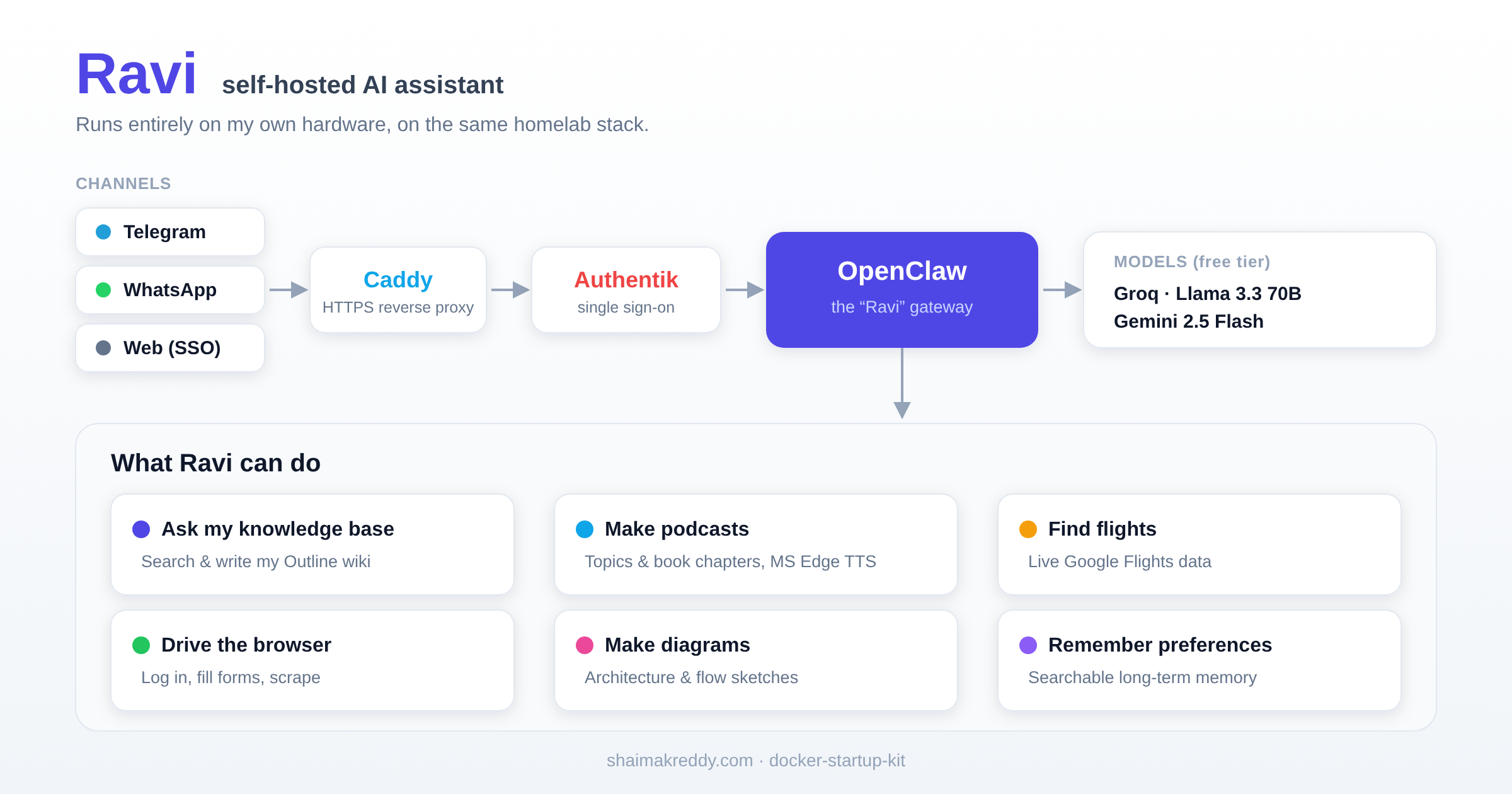
Ravi is a self-hosted AI assistant that runs on my homelab. I talk to it from Telegram or WhatsApp, and it can act on my own tools and data.
Ravi is built on OpenClaw, runs entirely on my own hardware, and uses free-tier models (Groq and Gemini). Because it is self-hosted, my prompts and data stay on my machine. It sits behind the same Caddy reverse proxy and Authentik single sign-on as the rest of my homelab.
This article is a work in progress. I will keep adding use cases here as I find more use for them.
Ask my own knowledge base
Ravi is connected to my Outline wiki, so I can ask questions over my own notes and have it search, read, and write pages.
- “What did I note about the Guacamole RDP setup?” returns the answer from my wiki.
- “Create a page in my Ideas collection summarising this chat.” and it writes it.
The workflow: Ravi runs a search across the wiki, reads the matching pages, and answers from them, so I get my own words back instead of a generic reply.
Turn topics and books into podcasts
Ravi researches a topic, or reads a chapter from a book I drop into a folder, and generates a two-host audio podcast. The voices use Microsoft Edge TTS, which is free and sounds natural.
- “Make a 15-minute podcast about the history of LLMs.”
- “List the chapters in this book, then make a podcast for chapter 3.”
The workflow: Ravi gathers the source (web research or the book chapter), writes a two-host script, renders it to audio with MS Edge TTS, and sends the finished MP3 to me on Telegram to listen on the go.
Find cheap flights
Ravi searches live Google Flights data, so I can ask in plain language and get real prices back. No API key, no manual searching.
- “Find Seoul to Bangalore flights in late July, economy, under a set budget.”
- “What are the cheapest dates to fly next month?”
Drive the browser
Ravi can control a real browser: log in, fill forms, and pull information from pages. Useful for multi-step tasks on the sites I use.
- “Log into this site and download my latest statement.”
- “Pull the key details from this page and summarise them.”
Make diagrams
Ravi generates architecture and flow diagrams from a description, which is handy when I want to sketch an idea quickly. (The diagram at the top of this page is the kind of thing it can draft.)
Remember what matters
Ravi keeps a searchable memory, so I tell it a preference once and it recalls it later. Over time it gets a better sense of how I like things done.
How I reach it
- WhatsApp: easy to connect and always on my phone, good for quick questions.
- Telegram: my preferred channel for large files, since it sends the podcast audio and documents without the size limits.
- Web: a browser UI behind my single sign-on, reachable from anywhere.